Nginx 502 Bad Gateway: causes and how to fix it
A 502 from Nginx means Nginx itself is working but the application it forwards requests to (Node, PHP-FPM, Gunicorn, a container) did not give it a valid response. The Nginx error log names the exact reason; most often the backend is not running, listens on a different address, or Nginx is not allowed to reach its socket.
On this page
What it means
When Nginx works as a reverse proxy, it receives the visitor's request and passes it on to another program, called the upstream: an application server, PHP-FPM, or a container. The HTTP standard defines 502 Bad Gateway as the answer a proxy gives when it got an invalid response from that upstream. So the page you see comes from Nginx, but the problem is almost always on the hop between Nginx and the application.
A related code helps narrow it down: if the upstream accepts the connection but does not answer in time, Nginx returns 504 Gateway Timeout instead. A 502 usually means the connection failed outright or the answer was malformed or cut off.
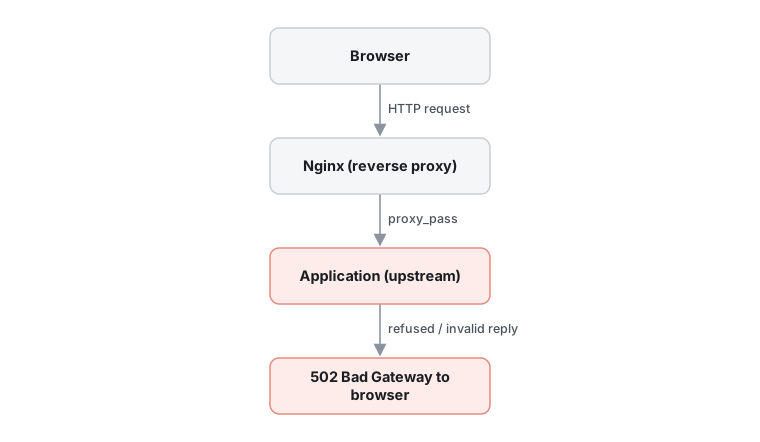
Symptoms and causes
You are likely dealing with this problem if:
- Browsers show 502 Bad Gateway with nginx (and often a version) at the bottom of the page.
- Static files served by Nginx still load, while pages handled by the application fail.
- The error appears right after a deploy, a restart or a configuration change, or under heavy load.
The usual causes, most common first:
- The upstream is not running
- The app crashed, failed to start after a deploy, or was killed for using too much memory, so nothing listens where Nginx connects. The log says
connect() failed (111: Connection refused). - Wrong address, port or socket
proxy_passorfastcgi_passpoints to a port or socket path the app does not use, for example after a PHP version upgrade changed the PHP-FPM socket name.- Nginx is not allowed to connect
- Socket file permissions, or SELinux on Red Hat based systems, block the Nginx worker. The log shows
(13: Permission denied). - The response is too big or cut off
- Very large response headers (often big cookies) overflow the proxy buffer (
upstream sent too big header), or the app closes the connection mid-response (upstream prematurely closed connection). - All upstream servers marked as failed
- With several servers in an
upstreamblock, Nginx stops sending to ones that failed recently and logsno live upstreams.
How to fix it
Work through these in order. They start with the quickest, safest checks and move to deeper repairs; stop as soon as the problem is gone.
1.Read the Nginx error log
Each cause of a 502 writes a different message, so the log tells you which of the fixes below applies.
- Follow the error log and reload the failing page (the default path on most Linux packages is shown; check the
error_logdirective if yours differs):sudo tail -f /var/log/nginx/error.log - Match the message:
Connection refused→ fix 2;No such file or directorywith a socket path → fix 3;Permission denied→ fix 4;too big header→ fix 5;prematurely closed→ fix 2 and the app's own log;upstream timed out→ it is really a 504, see the note in fix 5.
2.Check that the application is running and listening
Connection refused means nothing accepts connections on the address Nginx uses. The app must be started, or restarted after a crash.
- Check the service (replace the name with your app's systemd unit, for example
php8.3-fpm,gunicornormyapp):systemctl status myapp journalctl -u myapp -n 50 --no-pager - See what is actually listening on the port from your
proxy_passline (here 3000):sudo ss -ltnp | grep 3000 - Ask the app directly, bypassing Nginx. A normal HTTP answer means the app is fine and the problem is in the Nginx configuration:
curl -i http://127.0.0.1:3000/ - If the app is stopped or crashing, start it and read its own log for the reason (missing environment variable, port already in use, out of memory). For containers,
docker psanddocker logs <container>show the same.
3.Make proxy_pass point to the right address or socket
Nginx and the app have to agree on one address. A typo, a changed port, or a renamed socket after an upgrade breaks every request.
Before you start: Test the configuration before reloading; a syntax error would stop Nginx from applying any changes.
- Find where Nginx sends requests:
sudo nginx -T | grep -nE 'proxy_pass|fastcgi_pass|upstream' - Compare it with the app's listen address. For PHP-FPM, the socket path is the
listenline of the pool file:grep -R '^listen' /etc/php/*/fpm/pool.d/ ls -l /run/php/ - Correct the
proxy_pass(orfastcgi_pass) line, for example:location / { proxy_pass http://127.0.0.1:3000; } location ~ \.php$ { include fastcgi_params; fastcgi_param SCRIPT_FILENAME $document_root$fastcgi_script_name; fastcgi_pass unix:/run/php/php8.3-fpm.sock; } - Test and reload:
sudo nginx -t && sudo systemctl reload nginx
4.Fix socket permissions or SELinux
With (13: Permission denied) the address is right but the Nginx worker user (often www-data or nginx) may not open the socket, or SELinux forbids Nginx from making network connections.
Before you start: Grant only what Nginx needs. Do not make the socket writable for everyone and do not switch SELinux off; both open the server to other problems.
- Check which user Nginx runs as and who owns the socket:
ps -o user= -C nginx | sort -u ls -l /run/php/php8.3-fpm.sock - For PHP-FPM, set the socket owner in the pool file to the Nginx user, then restart PHP-FPM:
listen.owner = www-data listen.group = www-data listen.mode = 0660 - On RHEL, Rocky, Alma or Fedora with SELinux enforcing, a proxy to a TCP port is blocked by default. Check for denials and allow Nginx to connect:
sudo ausearch -m avc -ts recent | grep nginx
sudo setsebool -P httpd_can_network_connect 1
5.Raise proxy buffers for large response headers
Nginx reads the start of the upstream response, including headers, into a buffer of one memory page (4K or 8K) by default. Large cookies or many headers overflow it and Nginx answers 502 with upstream sent too big header.
Before you start: Bigger buffers use more memory per connection. Raise them moderately and only where needed.
- Add larger buffers in the
locationorserverblock that proxies the app:proxy_buffer_size 16k; proxy_buffers 8 16k; proxy_busy_buffers_size 32k; - For PHP-FPM use the matching
fastcgi_buffer_sizeandfastcgi_buffersdirectives instead. - Test with
sudo nginx -tand reload. If the log instead saysupstream timed out, the request is too slow rather than broken: raiseproxy_read_timeout(default 60s) only after making the slow request faster where possible.
Check that it worked
curl -I https://your-site/returnsHTTP/1.1 200(or the status your page should have) instead of 502.- New 502 entries stop appearing in
/var/log/nginx/error.logwhile you browse the site. - After a restart of the app or the server, the site comes back on its own (the app's systemd unit is enabled:
systemctl is-enabled myapp).
If it still fails
- If the 502 only happens under load, the app may be running out of workers or memory: check
dmesgfor OOM kills and the app's worker settings. - If a CDN or Cloudflare sits in front, check whether the 502 page is theirs or Nginx's: the footer and response headers say which server produced it.
- Compare with a known-good configuration from version control, and read the ngx_http_proxy_module documentation for the directives you use.
Sources
- Module ngx_http_proxy_moduleOfficial · nginx.org
- Module ngx_http_upstream_moduleOfficial · nginx.org
- 502 Bad Gateway · MDN Web Docs
- RFC 9110: HTTP Semantics, 502 Bad GatewayOfficial · IETF